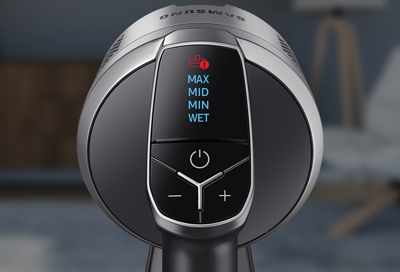


Your Samsung Jet Stick vacuum uses display icons to alert you to issues such as clogs, a stuck spinning brush, or a missing filter. Understanding what these icons mean helps you quickly identify and fix the problem so your vacuum can run smoothly again.
Icon appears on the Samsung Jet Stick
Clogged
The dustbin, pipe, or suction part is clogged.
Read more
Read less
Spinning brush stuck
Foreign matter is clogged at the spinning brush.
Read more
Note
This icon won't turn on if the vacuum has turned off due to overheating.
Read less
No filter
The washable micro filter is not assembled correctly.
Thank you for your feedback! Your comment has been submitted.
We're here for you
Contact Samsung Support
Contact us online through chat and get support from an expert on your computer, mobile device or tablet. Support is also available on your mobile device through the Samsung Members App.
You Are About To Be Redirected To Investor Relations Information for U.S.
Thank you for visiting Samsung U.S. Investor Relations. You will be redirected via a new browser window to the Samsung Global website for U.S. investor relations information.
Aquí podrás navegar y comprar tal y como lo harías en la web de la tienda o marca desde la península. Tu
experiencia de compra y el surtido al que podrás acceder será exactamente la misma. Syniva solo actúa como
intermediario para poder llevarte el pedido a canarias y puedas ahorrarte el IVA.
Escoge el producto que quieras y añádelo al carrito, te mostraremos el PVP de península y el de Syniva
descontándote el IVA. Así podrás ver claramente lo que te ahorras. El total del resumen de compra incluye todos
los gastos por lo que ¡No te llevarás ninguna “sorpresa” al recibir tu pedido!
Ten encuenta que navegas en la web que la marca o tienda online ofrece a los residentes de la península y es
posible que veas información o condiciones específicas para ese territorio. Recuerda que tienes toda la información
de Syniva en el apartado de ayuda: métodos y costes de envío, métodos de pago y cualquier información relativa a
los servicios de Syniva . Para cualquier consulta puedes ir al apartado de Faqs del menú ayuda o escribirnos a
[email protected]
¡Disfruta de tus compras!
?
Cargando...
Se ha añadido un nuevo artículo en tu cestaVer CestaSeguir comprando